





Best MagSafe Accessories to Buy in 2026
If you’ve ever fumbled a wireless charger trying to line up the coils just right, you already know why MagSafe caught on. The magnets do the alignment for you, and once you build a setup around that little ring of magnets, going back feels clumsy. But not every accessory that slaps a magnet on a case is actually good, and figuring out the best magsafe accessories for your specific habits (driving, working at a desk, traveling) takes some sorting.
I’ve gone through the current lineup, from Apple’s own gear to the third-party stuff that’s quietly gotten very good, and put together what’s actually worth buying right now. Quick verdict first, then the details.
The Quick Verdict
If you want one thing that does almost everything well, Anker’s MagGo line covers chargers, power banks, and car mounts at a fair price. If you want the official Apple experience with zero compatibility guesswork, the Apple MagSafe Charger is still the safest bet. And if your main use case is driving, Belkin’s car mounts are hard to beat for how solidly they hold an iPhone at speed.
Quick Comparison
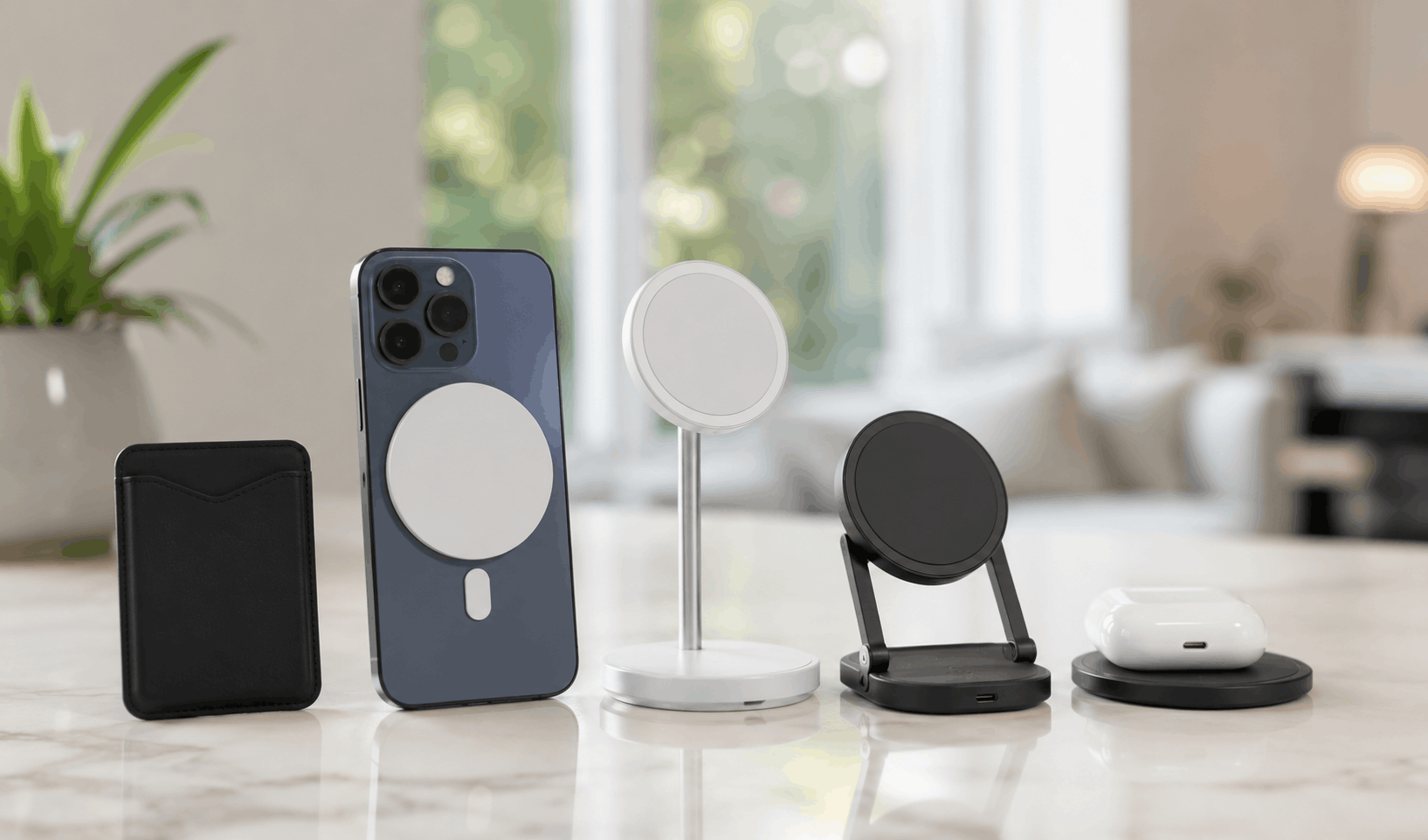
| Accessory | Best For | Price Range (as of July 2026) | Standout Feature |
|---|---|---|---|
| Apple MagSafe Charger | Official reliability | ~$39 | Guaranteed compatibility, tight Apple integration |
| Anker MagGo Power Bank | Travel and backup power | $40–$70 | Built-in kickstand, decent battery capacity |
| Belkin BoostCharge Pro Car Mount | Driving | $50–$80 | Strong magnetic hold, adjustable vent/dash mounts |
| ESR HaloLock Wallet | Everyday carry | $20–$35 | Slim profile, card capacity without bulk |
| Peak Design Mobile Mount | Photography and outdoor use | $40–$60 | Quick-release, works with tripods and bike mounts |
| Moft Snap Stand | Desk and video calls | $25–$40 | Foldable, doubles as a laptop stand base |
Pricing shifts often enough that I’d check each brand’s site directly before buying, especially around Apple’s product refresh cycles.
Apple MagSafe Charger
This is the one everyone starts with, and honestly, there’s a reason for that. It’s a 1-meter braided cable with a magnetic charging puck on the end, and it snaps onto the back of any MagSafe-compatible iPhone with a satisfying click. Apple sells it directly and it’s documented in detail on their MagSafe support page, which is worth a skim if you’re unsure about compatibility with older iPhone models.
What it does well: it just works, every time, with no fiddling. What it doesn’t do well: the charging speed tops out around 15W (7.5W on some older phones), which is noticeably slower than a good USB-C cable plugged directly in. It also doesn’t come with a wall adapter, which annoyed a lot of first-time buyers when it launched and still catches people off guard.
Best for: People who want the simplest, most dependable option and don’t mind paying a bit of a premium for the Apple badge. Skip if: You’re charging overnight regularly and want the fastest possible speed, in which case a wired cable still wins.
Anker MagGo Power Bank
Anker’s MagGo lineup has become the go-to for a lot of people who want charging on the move, and in my experience, magnetic power banks in this category tend to live or die on how well the magnets actually hold during regular use, not just when the phone is sitting flat on a table. The MagGo bank passes that test better than most competitors I’ve seen reviewed.
It snaps onto the back of your phone, charges it wirelessly, and folds out into a kickstand so you can prop your phone up while it charges. Capacity varies by model, but most sit in the 5,000-10,000mAh range, enough for a partial to full charge depending on your phone’s battery size.
The tradeoff is weight. Strapping a battery pack to your phone adds noticeable heft, and if you’re already carrying a heavier phone, it can feel like a lot in one hand. Anker’s own product listing breaks down the specific wattage and capacity for each model in the line, since they update it fairly often.
Best for: Travel days, festivals, anything where an outlet isn’t guaranteed. Skip if: You mostly charge at a desk or overnight, where a stationary charger makes more sense.
Belkin BoostCharge Pro Car Mount
Car mounts are where a weak magnet really shows itself, since road vibration and quick turns will expose any accessory that’s cutting corners. Belkin’s BoostCharge Pro line has held up well in this category, and the magnetic hold feels genuinely secure even on rougher roads.
It mounts to your vent or dash, and some versions include wireless charging built into the mount itself, so your phone charges while it’s held in place. Belkin documents the full lineup and compatibility notes on their official site, which is worth checking since not every model includes charging.
One thing worth flagging: vent mounts can obstruct airflow more than people expect, so if you rely on your vents for defrosting in winter, a dash or CD-slot mount might serve you better.
Best for: Daily commuters and anyone who uses their phone for navigation regularly. Skip if: You already have a wired car charging setup you’re happy with, since this is mostly a convenience upgrade, not a necessity.
ESR HaloLock Wallet
Not every MagSafe accessory needs to be flashy. A magnetic wallet is one of the more underrated additions, mostly because it solves a small daily annoyance (carrying a separate wallet) without adding much bulk. ESR’s HaloLock wallets hold three to four cards comfortably and stay attached far better than the early magnetic wallets from a few years ago, which had a reputation for falling off at the worst moments.
The main limitation is capacity. If you’re used to carrying five or six cards plus cash, this isn’t going to replace your actual wallet. It’s a supplement for your most-used cards, not a full replacement.
Best for: People who want to ditch a bulky wallet for daily errands. Skip if: You carry cash regularly or need more than four cards on hand.
Peak Design Mobile Mount
Peak Design built its reputation on camera gear, and their magnetic mobile mounts carry that same attention to build quality. The system uses a quick-release mechanism that’s compatible with their tripods, bike mounts, and car mounts, so if you already own Peak Design camera accessories, this slots into that ecosystem cleanly.
It’s pricier than most other options on this list, and that cost is really only justified if you’re already using their broader accessory system or you do a lot of outdoor photography and want a phone mount that can survive a hike. For casual use, it’s probably more than most people need.
Best for: Photographers, cyclists, and anyone already invested in Peak Design’s ecosystem. Skip if: You just want a basic desk stand, since this is overkill for that.
Moft Snap Stand
Moft’s folding stands have quietly become a favorite for remote work and video calls. The stand folds flat when not in use, then pops out into an adjustable angle for watching videos, taking calls, or propping your phone up while you type on a laptop.
What surprised me looking into this category is how many people use these as a secondary laptop stand base too, since some Moft models are designed to stack with their laptop stands for a matched desk setup. It’s a small detail, but it’s the kind of thing that makes a $30 accessory feel more thought-through than it needs to be.
Best for: Desk setups, video calls, and watching content hands-free. Skip if: You need something rugged enough for outdoor or active use, since it’s built more for stationary settings.
Buying Guide: What Actually Matters
A few things are worth checking before you buy any MagSafe accessory, regardless of brand:
Magnet strength varies a lot between third-party brands, even when they claim MagSafe compatibility. Cheaper accessories sometimes use weaker magnets that hold fine on a table but fail under any real movement, like walking or driving. Reviews from established tech outlets, including The Verge’s coverage of MagSafe accessories, tend to flag this issue when it comes up.
Case compatibility matters more than people expect. A thick case, or one made from certain materials, can weaken the magnetic connection enough that charging becomes unreliable or accessories don’t snap on securely. If you use a case, check that it’s explicitly marketed as MagSafe-compatible rather than just “case that fits an iPhone.”
Charging speed differs across products even when they all say “MagSafe compatible.” Some third-party chargers cap out lower than Apple’s own hardware. If speed matters to you, check the wattage spec directly rather than assuming.
Frequently Asked Questions
Do MagSafe accessories work on older iPhones? MagSafe requires the internal magnetic ring that Apple added starting with the iPhone 12. Older models can sometimes use MagSafe accessories with a separate metal ring adapter, but the magnetic hold is noticeably weaker and charging won’t work the same way.
Can I use third-party MagSafe accessories with an official Apple case? Generally yes. Apple’s cases are designed to work with the full range of MagSafe accessories, and this is one of the more reliable compatibility combinations you’ll find.
Do MagSafe chargers work through a phone case? Most MagSafe-certified cases are thin enough not to interfere, but bulky cases, battery cases, or ones with metal components can weaken the connection or block charging altogether.
Is a MagSafe car mount safer than a regular phone holder? It can be, mainly because the one-handed attachment means less fumbling while driving. That said, the mount is only as good as its magnet strength, so a poorly made one can be worse than a traditional grip-style holder.
Which One Should You Actually Buy?
If you only buy one accessory, make it a charger, either Apple’s own or Anker’s MagGo version, since that covers the most common daily use case. From there, add based on your actual habits rather than what looks impressive. Commuters benefit most from a car mount. Frequent travelers get the most value from a magnetic power bank. Desk workers and remote employees will probably get more daily use out of a stand than anything else on this list.
The MagSafe ecosystem, which you can read more about on its Wikipedia entry, has grown well past what Apple originally shipped, and that’s mostly a good thing for anyone shopping around. Just don’t assume every “MagSafe compatible” label means equal quality, because the gap between the best and worst options in this space is bigger than the price tags suggest.
Also Read: GoPro Hero 5 and Hero 5 Black: What’s Actually Different