





Best Pixel 10 Case Options: What Actually Fits and Works
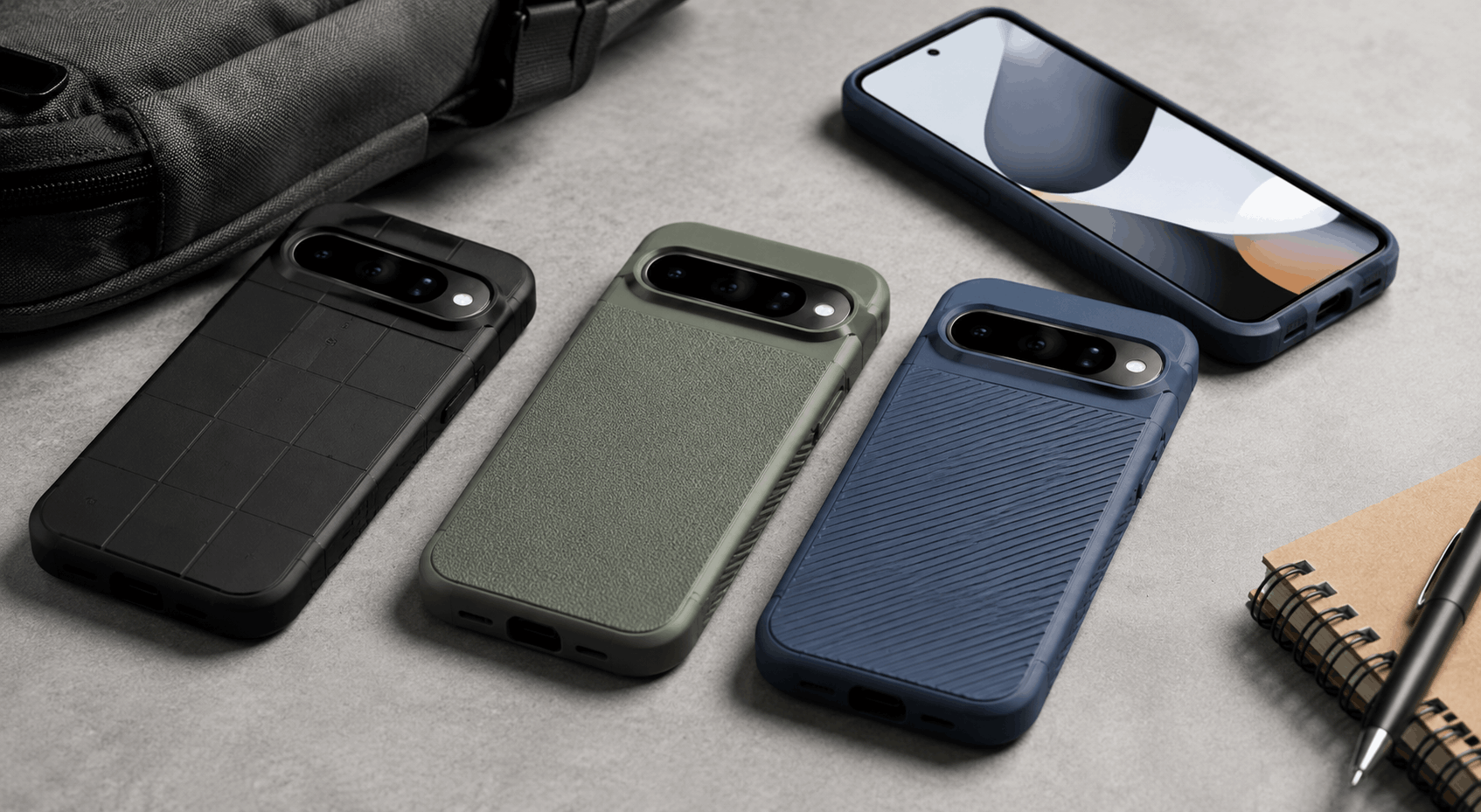
If you just picked up Google’s newest phone, don’t grab whatever pixel 10 case is cheapest on the first page of results. The camera bar shape changed again this year, Pixelsnap magnetic charging is new, and a case that doesn’t account for either of those things is going to cause you problems within a week.
I’ve watched enough Pixel launches to know the pattern by now. A new phone drops, the accessory market floods with generic cases within days, and half of them are just iPhone or Samsung molds with slightly adjusted cutouts. Some of those work fine. A lot of them don’t.
Why You Can’t Reuse an Old Pixel Case
The Pixel 10 carries over a similar look to the Pixel 9, but the changes underneath matter more than they seem. The camera bump is deeper and more pronounced this generation, the button placement shifted slightly, and Google added Pixelsnap, its Qi2-based magnetic charging system, which requires a case with a properly aligned magnetic ring built in.
None of that sounds dramatic on paper. In practice, it means a Pixel 9 case will sit crooked on a Pixel 10, the camera cutout won’t line up with the new module, and even if it technically fits, your magnetic charger won’t snap into place. I’d skip the temptation to save money by reusing an old case here. It’s genuinely not worth the hassle.
What Actually Matters When You’re Picking One
Most case marketing focuses on drop ratings and colors, which are fine things to know but not the whole picture. Here’s what I’d actually check before buying:
Camera bar precision. The Pixel’s camera bar has changed shape almost every generation, and cases ported over from other phone lines often have oversized cutouts that leave gaps around the lenses. Dust gets into those gaps and can scratch the glass over time. A case built specifically for the Pixel 10 should hug the module closely rather than leaving a loose ring around it.
Pixelsnap compatibility. Not every case with a magnet inside actually aligns correctly with Pixelsnap. Look for cases explicitly labeled as MagSafe compatible or Pixelsnap-ready rather than assuming any case with “magnetic” in the description will work. Google’s own Pixelsnap Case is a safe baseline here since it’s designed in-house specifically for charging accessories, magnetic wallets, and stands.
Button feel. This one gets overlooked constantly. Some cases cover the volume and power buttons with a layer of material that makes presses feel mushy or unresponsive. It’s a small thing until you’re trying to take a screenshot in a hurry and nothing happens.
Material and grip. Silicone feels nice but attracts lint. Polycarbonate is more durable but can feel slippery. TPU splits the difference and is probably the safest default if you’re not sure what you want.
The Realistic Price Range
As of mid-2026, expect to pay somewhere between $30 and $60 for a solid Pixel 10 case, with premium leather or aluminum-backed options pushing past $70. Spigen’s lineup runs from around $39.99 for their Liquid Air MagFit up to $59.99 for the Tough Armor AI. Mous sits at the higher end, with their clear MagSafe-compatible case priced near $70 and leather options running even higher.
Anything under $15 is worth being skeptical of. It’s not impossible to find a decent budget case, but at that price point you’re usually getting an oversized camera cutout, no real magnetic alignment, and buttons that feel like they’re covered in a wet paper towel.
Case Types Worth Considering
| Type | Best For | Typical Price |
|---|---|---|
| Slim/clear | Showing off the phone’s color, minimal bulk | $25–$40 |
| Rugged/armored | Frequent drops, outdoor or work use | $40–$60 |
| Leather/folio | Card storage, dressier look | $40–$70 |
| Aramid fiber | Thinnest possible profile with real strength | $50–$70 |
| Kickstand | Video calls, watching content hands-free | $35–$60 |
I lean toward slim clear cases for daily use because they let the phone’s actual design show through, and Google puts real effort into its color options. But if you’re rough on your phone or work somewhere dusty, a rugged case with a raised camera lip is the smarter call even if it adds bulk.
Where to Actually Buy One
Spigen’s Pixel 10 collection covers most of the practical middle ground, with MagFit-compatible options across their Liquid Air, Thin Fit, and Rugged Armor lines. They’ve been making Android cases since 2008, and while their prices have crept up over the past couple of years, the fit and durability are consistent.
If rugged protection is the priority, OtterBox still runs its own certified drop-testing facilities, which is more than most competitors can claim. Their Defender line for Pixel phones tends to run bulkier than most people want for daily carry, but if you’ve cracked a screen before, that bulk starts to feel worth it.
CNN Underscored tested a range of Pixel 10 cases and landed on similar conclusions: Pixelsnap compatibility and camera fitment matter more than brand name once you’re past the bargain-bin tier.
A Word on Camera Bump Protection Specifically
If you’ve owned a Pixel before, you already know the camera bar picks up scratches faster than you’d expect, especially when you set the phone face-up on a table. What tends to surprise people is how much this varies between cases that all claim a “raised edge.” A lip that’s actually 2mm or more will keep the lens glass off most flat surfaces. A lip that’s technically raised but flexes under light pressure won’t do much at all. If camera protection is your main concern, look for cases with individually molded lens cutouts rather than one big open rectangle around the whole bar.
Frequently Asked Questions
Will a Pixel 9 case fit my Pixel 10? No. The camera module, button placement, and overall dimensions shifted enough that a Pixel 9 case won’t sit right, and it definitely won’t support Pixelsnap.
Do all Pixel 10 cases support wireless charging? Most do, since Qi charging just needs a thin enough back panel. Pixelsnap magnetic alignment is a separate feature and only works if the case has a built-in magnetic ring positioned correctly.
Is a case actually necessary if I already have a screen protector? A screen protector only covers the front glass. The Pixel 10’s camera bar, back glass, and edges are still exposed without a case, and that’s usually where damage from drops actually happens first.
What’s the difference between the Pixel 10 and Pixel 10 Pro cases? They’re not interchangeable. The Pro has a taller frame and a more pronounced camera housing, so you need a case sized specifically for your model, not just labeled “Pixel 10.”
Are aramid fiber cases actually worth the extra cost? If a thin, nearly caseless feel matters to you more than anything else, yes. They’re genuinely impressive for how little bulk they add given the strength. If you want maximum drop protection instead, that money is better spent on a rugged case.